 nutri
Find patterns between food and your body.
Connect your meals with sleep and heart readings from Apple Health.
 Join the beta
Free beta for iPhone, via Apple TestFlight.

Look closer at each finding.
See the comparison, the evidence, and what it can tell you.


Do your readings differ on dairy days?
- After dairy days
- 45.4 ms
- After days without dairy
- 61.8 ms
Median overnight HRV · 46 paired days
The groups overlap; this doesn’t establish cause.
What went into this finding?
31 dairy days and 15 days without dairy, from 57 logged days. Days with foods Nutri couldn’t classify were left out.
Does coffee timing line up with different readings?
- After afternoon caffeine
- 48.1 ms
- After morning-only caffeine
- 63.8 ms
Median overnight HRV · 53 paired days
The readings overlap; other habits may differ too. This doesn’t establish cause.
What went into this finding?
33 days with caffeine at or after noon and 20 with morning-only caffeine, from 57 logged days. Both groups include caffeine.
Does magnesium intake line up with your sleep?
Higher logged magnesium intake lined up with longer sleep.
53 paired days · 60-day window
This association doesn’t show that magnesium improves sleep.
What went into this finding?
Daily magnesium intake paired with the following night’s sleep duration. Each chart point shows an adjusted pair. Other factors may differ between days.
What else can Nutri compare?
Nutri can compare meal timing, foods, caffeine, alcohol, vitamins and minerals with your Apple Health readings.
You choose which readings to sync, including sleep, resting heart rate, HRV, respiratory rate and VO2 max: the most oxygen your body can use during hard effort. The standard measure of aerobic fitness. ACSM, Guidelines for Exercise Testing and Prescription ↗ .
A closer look at the analysis
Sleep and heart readings can be similar from one day to the next. Nutri accounts for this in its analysis and can look at readings from the same day or later days.
We also tested the analysis with generated meal and health data that had no underlying link. Initially, it reported a pattern in 89.5 out of 100 tests. After changes, that fell to 5-7 out of 100 before insights went live. This test checks false findings in generated data; it doesn’t establish how well an individual finding applies to you.
Start with a meal.
Photograph, search or describe a meal. Review the foods and nutrient estimates before saving.


Vitamins and minerals.
See up to 28 vitamins and minerals, with daily targets and trends.
Coverage depends on the food data available.
Which vitamins and minerals?
15 minerals
- Calcium
- Iron
- Magnesium
- Zinc
- Potassium
- Sodium
- Phosphorus
- Selenium
- Copper
- Manganese
- Chromium
- Molybdenum
- Iodine
- Chloride
- Fluoride
13 vitamins
- Vitamin A
- Vitamin C
- Vitamin D
- Vitamin E
- Vitamin K
- Vitamin B6
- Vitamin B12
- Folate
- Thiamin
- Riboflavin
- Niacin
- Pantothenic acid
- Biotin


Your record over time.
More logged days give Nutri more to compare. Each finding shows the evidence behind it.
-
Day 2
Nutrients against your targets
-
Day 7
Early pattern: an association found in a small number of logged days. It may change as more data is collected. with overnight HRV
-
Day 14
Nutrients against sleep and heart, marked Exploratory: a possible association that needs more data to assess.
-
Day 30
Food and health patterns, labelled by strength of evidence
Explore trends in the app


Water, weight, supplements and optional streaks
- Water
- Track your intake against a daily goal.
- Weight
- Record your weight alongside your meals.
- Supplements
- Log supplements and set reminders.
- Streaks
- Keep track of logging streaks, or turn them off.
Nutri on Apple Watch.
Check your day, log a recent food, or pick up a pattern from your iPhone.
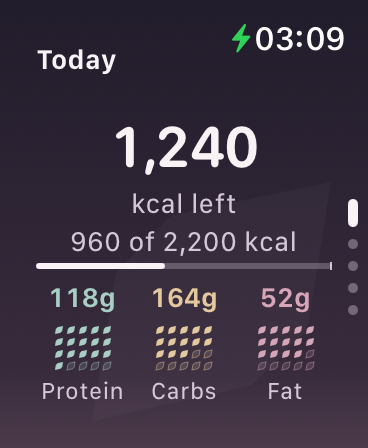
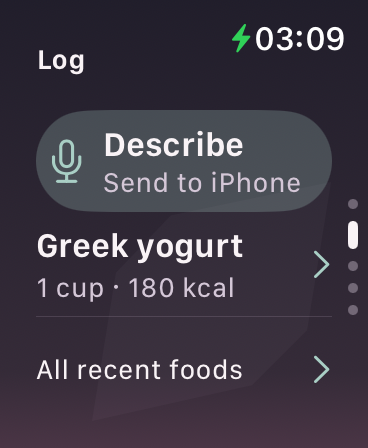
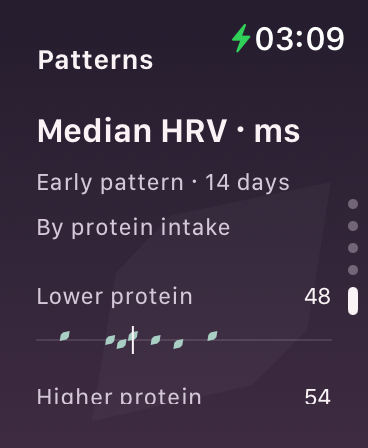
Swipe to explore. Tap a screen for a closer look.
Control your data.
Encrypted, with export and deletion available in the app.
Read the privacy policy- Photos aren’t kept
- Processed in the EU, then discarded. Never used for training.
- Never sold
- No sales to advertisers, analytics companies or researchers.
- Health sync is your call
- Turn off Apple Health sync and the synced copy is deleted.
Questions
Do I need a smartwatch?
No. You can log food and track nutrients with just your iPhone. To compare meals with sleep or heart readings, you need that data in Apple Health, usually from a compatible watch or ring.
Where do the nutrient numbers come from?
FoodData Central: the US Department of Agriculture's public nutrient database for generic and branded foods. Nutri uses it to look up nutrient values. USDA FoodData Central API guide ↗ and Open Food Facts: an open database of packaged foods and barcodes, maintained by contributors. Nutri uses it to look up scanned products. Open Food Facts API reference ↗ . When Nutri looks a food up, only the barcode or the search term is sent.
What does the beta cost?
The beta is free through Apple’s TestFlight. Tap Join the beta or scan the QR code to install it. No invite needed.
TestFlight is asking for a code?
You don’t need one. The Redeem button is for email invites. Tap Join the beta again with TestFlight installed and Nutri opens with an Accept button.
Is this medical advice?
No. Nutri shows patterns in your own data. If you’re thinking about changing your diet for a health reason, talk to your doctor.
Anything else: support@gonutri.app
